> ## Documentation Index
> Fetch the complete documentation index at: https://docs.empirical.run/llms.txt
> Use this file to discover all available pages before exploring further.
# Branching
> Align tests changes with new feature and environments
Branching is available in preview. Please contact us to enable it for your team.
Tests written by Empirical are saved in a git repo, and by default, all test runs
use test code from the default branch of the repo (usually called "main"). However, this is
sub-optimal in two scenarios.
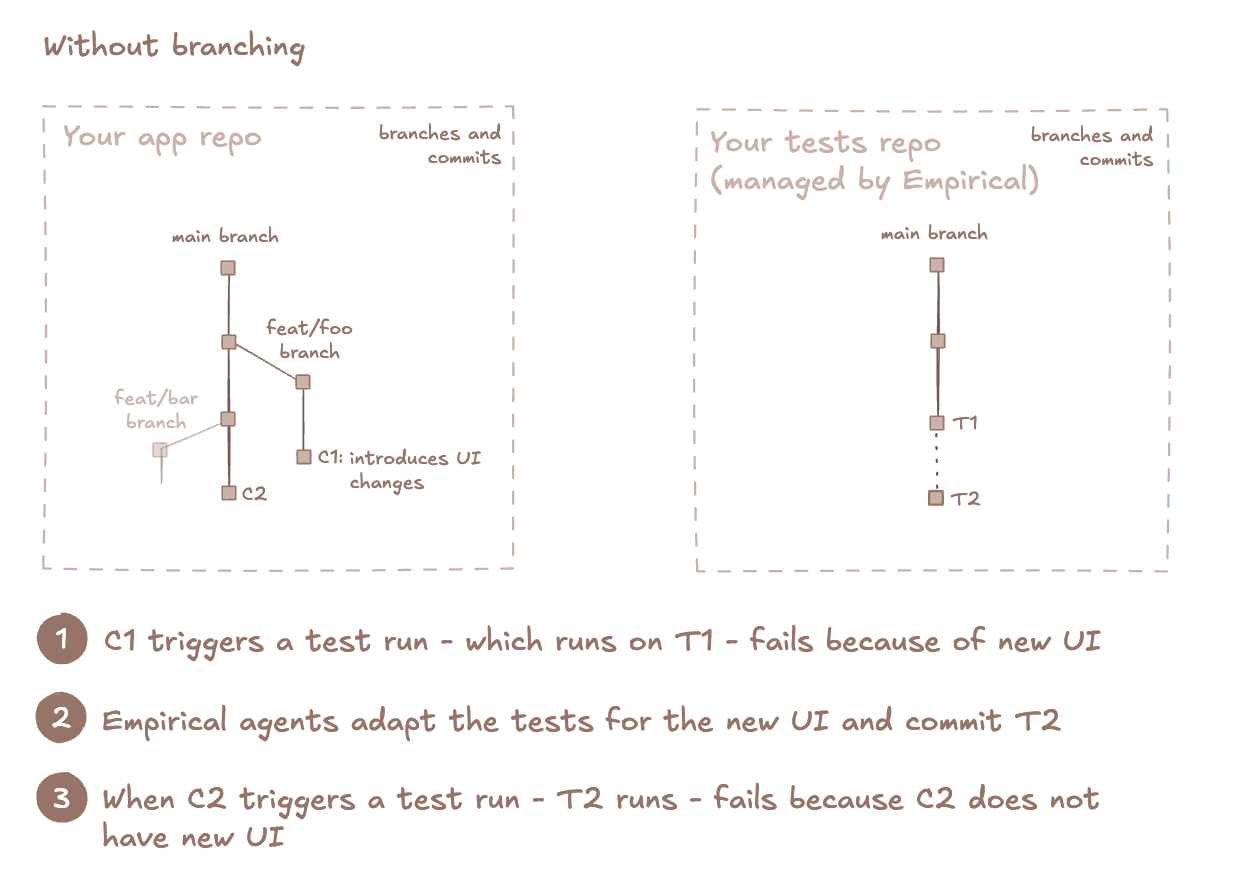
### Feature branches
If feature changes introduce UI changes, tests need to be updated
for that particular branch. Test runs from other branches will fail, because they don't have
corresponding UI changes.
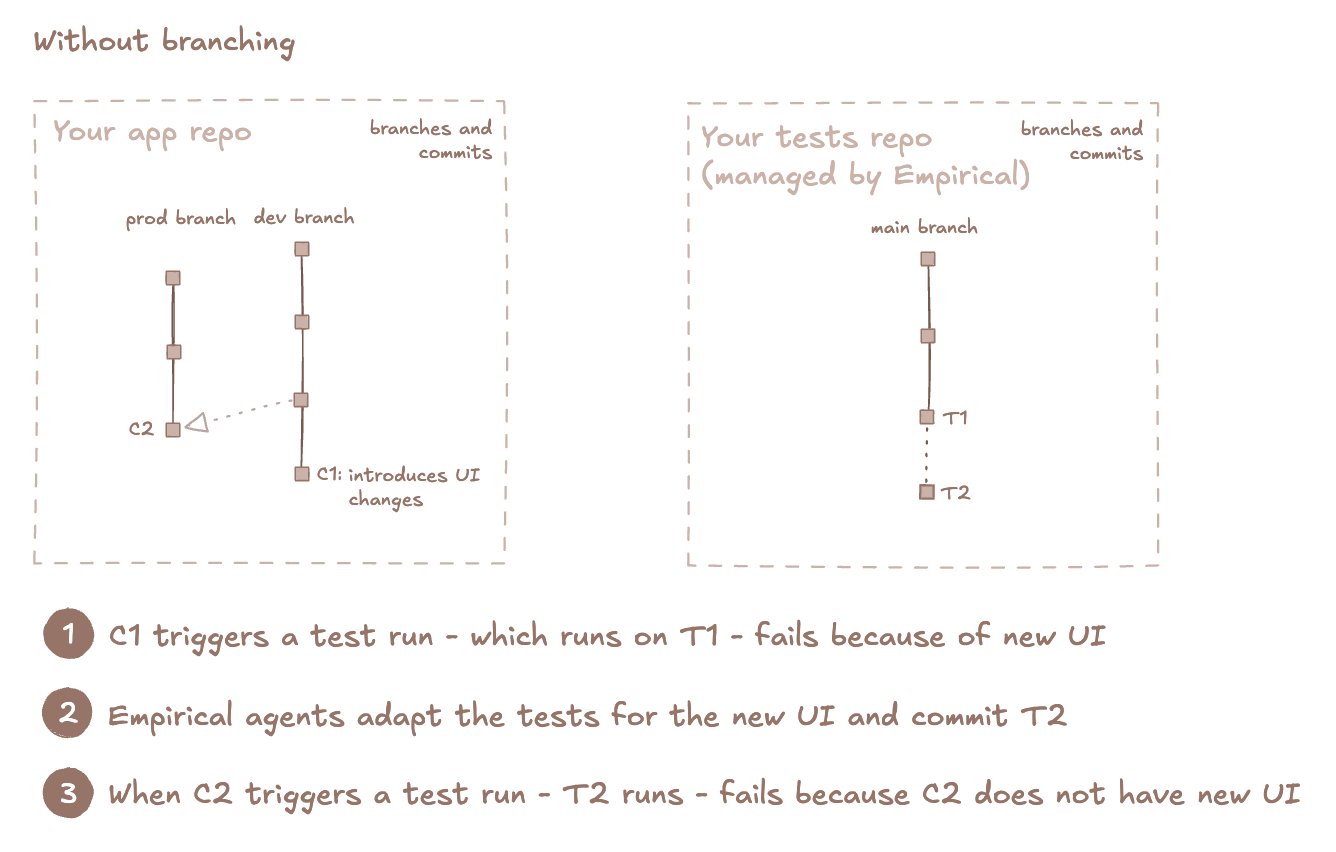
 ### Environment branches
Your pre-prod branch has new app changes that add/modify tests, but you
want to be able to run tests on prod, without those changes.
### Environment branches
Your pre-prod branch has new app changes that add/modify tests, but you
want to be able to run tests on prod, without those changes.
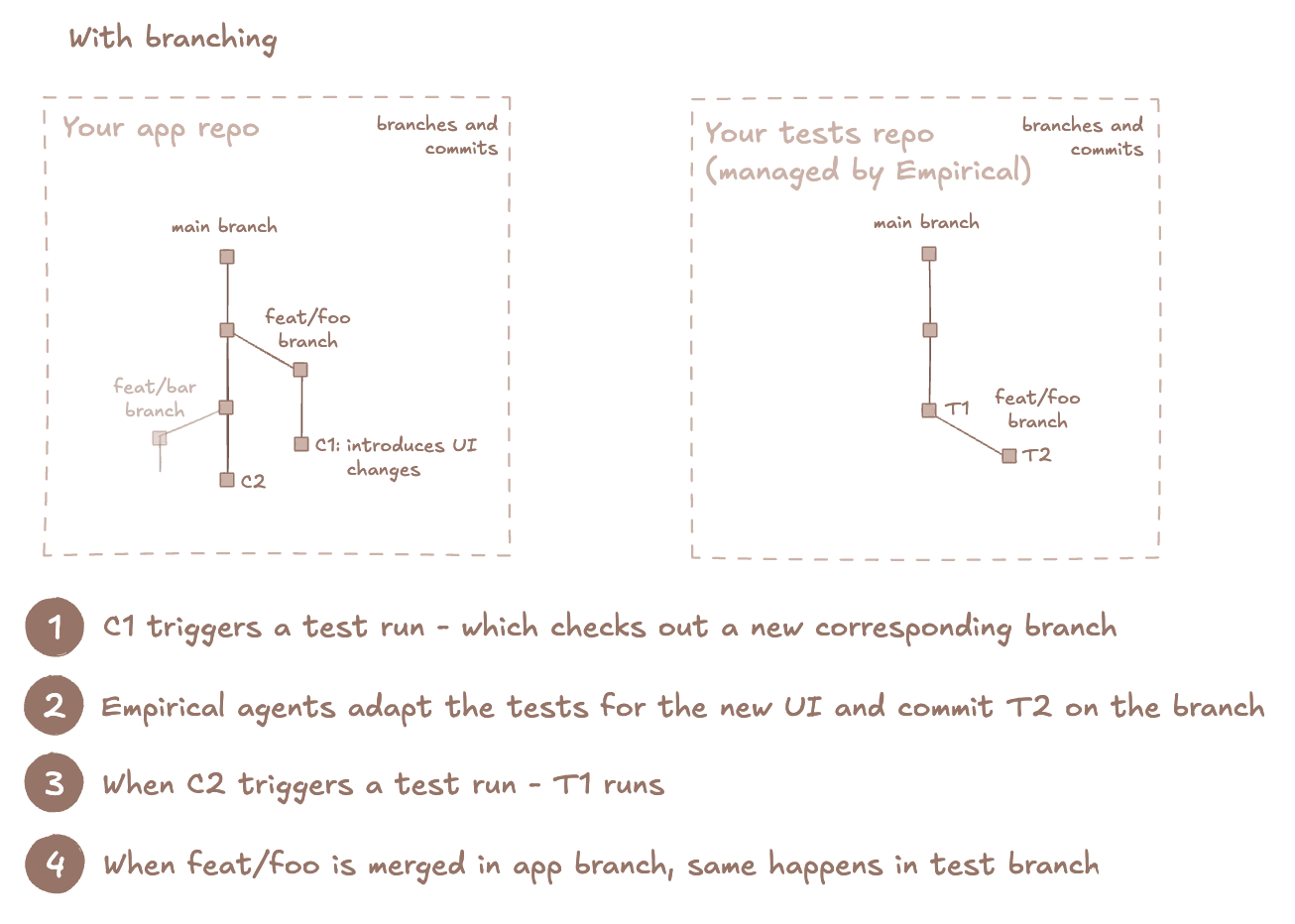
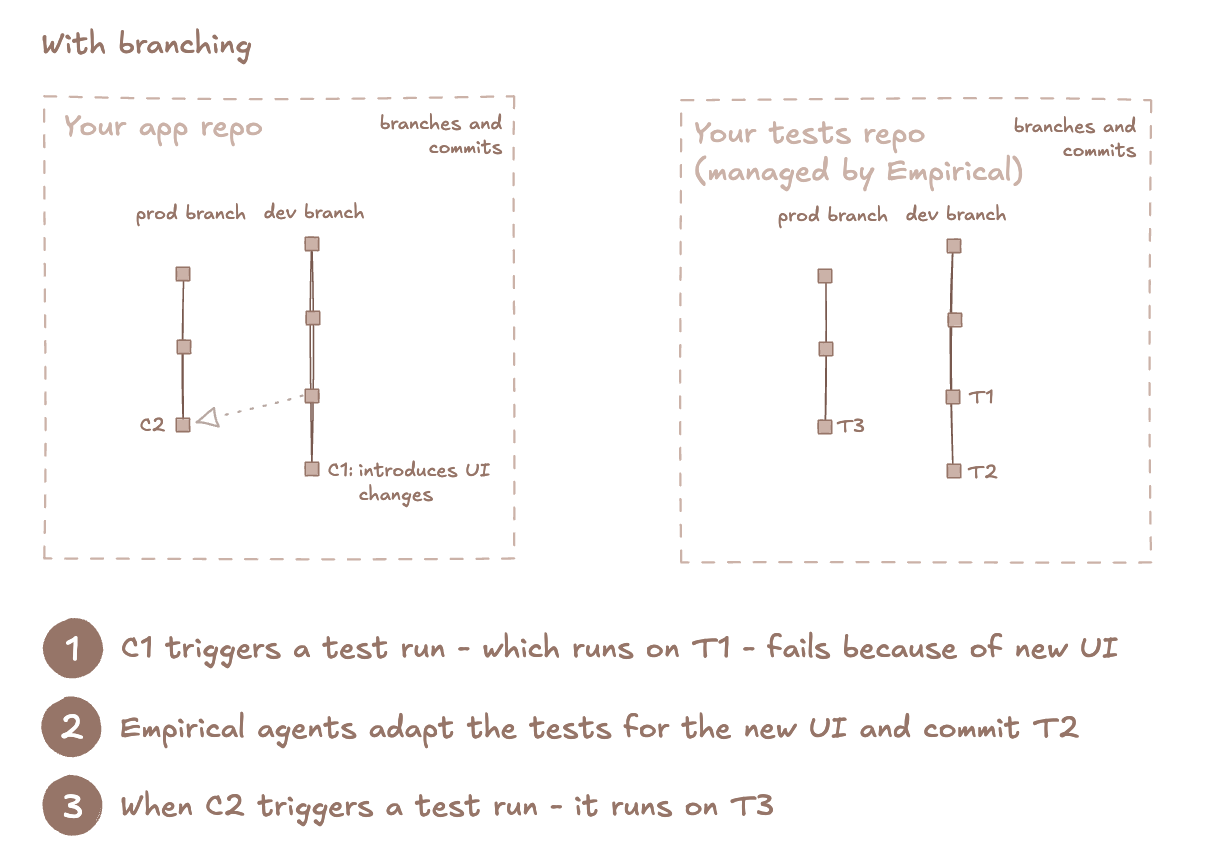
 To fix this, you can opt into using branching in the test repo. Branching in Empirical is built on
top of git branches, and enables you to maintain branches corresponding to branches in your app repo.
## Get started
Based on the use-case to solve, there are two types of branches in Empirical.
### Preview branches
These short-lived branches that represent feature branches with preview deployments. These
branches are expected to be merged into a persistent branch.
To fix this, you can opt into using branching in the test repo. Branching in Empirical is built on
top of git branches, and enables you to maintain branches corresponding to branches in your app repo.
## Get started
Based on the use-case to solve, there are two types of branches in Empirical.
### Preview branches
These short-lived branches that represent feature branches with preview deployments. These
branches are expected to be merged into a persistent branch.
 ### Persistent branches
These are long-lived branches that represent deployment environments. One of the persistent branches
is the **default branch** which is where your features are first merged.
### Persistent branches
These are long-lived branches that represent deployment environments. One of the persistent branches
is the **default branch** which is where your features are first merged.
 Getting started steps are slightly different, so you should know what type of a branch you want to
set up. It is possible to set up branching for either type or both preview and persistent branches together.
### Configure default branch name
For new projects, the default branch is `main`, and this can be modified in [Settings](https://dash.empirical.run/settings).
The choice of default branch matters if you have multiple persistent branches. Just like one of your persistent
branches is where new features land, you need to have a corresponding default branch in Empirical where new tests
land. For example, if your features get merged to `staging` branch in your app, it is a good idea for the
Empirical default branch to be called `staging`.
### Setup preview branches
* Navigate to [Branches](https://dash.empirical.run/branches) and enable branching
* Triggering test runs: when using one of the CI/CD triggers, ensure that you are passing the source branch
* [GitHub Actions](/triggers/ci-cd#github-actions) trigger: No action required, branch info is sent internally
* [API call](/triggers/ci-cd#other-providers) trigger: Ensure you are passing the `build.branch` parameter in the request payload
* Add [merge branch step to your CI workflows](#merge-branch-workflow): this will inform Empirical that a feature branch has been merged
into a persistent branch
* Preview branches get auto-deleted when they are merged
A preview branch is created when the first test run trigger is received for that branch, and deleted when the preview branch is merged.
* First test run for the branch: checks out the branch from the default branch
* Subsequent test runs for the branch: create a *merge commit* between this branch and the default branch, and runs the default commit.
This simulates what the test code would look like after merging, and ensures that new changes to the default branch are available for
the test run. This is similar to GitHub's [pull\_request event](https://docs.github.com/en/actions/reference/workflows-and-actions/events-that-trigger-workflows#pull_request).
* Note that if the test code are not auto-mergeable (due to merge conflicts), the test run will not start. This preempts an error
that will happen on the merge step.
### Setup persistent branches
* Navigate to [Branches](https://dash.empirical.run/branches) and enable branching
* On the same page, configure persistent branches
* When a new persistent branch is first configured, Empirical ensures that the branch exists in the repo, and if not, checks
it out from the default branch
* Since it is a git branch, you can also check it out at a particular commit using git commands manually
* Even if a branch already exists in the git repo, it must be labeled as "persistent" in the Empirical dashboard
* Triggering test runs: when using one of the CI/CD triggers, ensure that you are passing the source branch
* [GitHub Actions](/triggers/ci-cd#github-actions) trigger: No action required, branch info is sent internally
* [API call](/triggers/ci-cd#other-providers) trigger: Ensure you are passing the `build.branch` parameter in the request payload
* If you are passing environment to the request payload, keep doing that: branch does not replace environments
* Add [merge branch step to your CI workflows](#merge-branch-workflow): this will inform Empirical that a persistent branch has been merged
into another persistent branch
* Unlike preview branches, persistent branches don't get deleted on merges
A persistent branch is created when the branch is configured on the Empirical dashboard, or earlier, if it already exists in the git repo. The
branch is not automatically deleted.
On incoming test run requests, the latest commit from the branch is run. Unlike preview branches, there is no merge commit between branches.
## Merge branch workflow
To make branching work, Empirical needs to know when a branch in your repo gets merged and where. Empirical
will do a corresponding merge in the test repo.
Note that this continues to treat your app as a black-box: we do not need the contents of your repo or app source code. This
only captures a branch lifecycle event.
### GitHub Actions
Add this to `.github/workflows/merge-branches.yaml`. Which branch to merge and where is automatically
picked up from the `pull_request` event that triggers this workflow.
```yml theme={null}
name: Merge branches in Empirical
on:
pull_request:
types: [closed]
jobs:
auto-merge:
if: github.event.pull_request.merged == true
runs-on: ubuntu-latest
steps:
- name: Merge branches in Empirical
uses: empirical-run/merge-branches-action@main
with:
auth-key: ${{ secrets.EMPIRICALRUN_KEY }}
```
### Other CI/CD providers
For other CI/CD providers, you can use our API endpoint to merge branches. Note that you
need to pass the correct values for head and base branch. Head branch is what gets
merged into the base branch.
```
curl -X POST https://api.empirical.run/api/projects/merge-branches \
-H "Content-Type: application/json" \
-H "Authorization: Bearer ${{ secrets.EMPIRICALRUN_KEY }}" \
-d '{
"head_branch": "${{ REPLACE_WITH_VALUE }}",
"base_branch": "${{ REPLACE_WITH_VALUE }}",
}'
```
Getting started steps are slightly different, so you should know what type of a branch you want to
set up. It is possible to set up branching for either type or both preview and persistent branches together.
### Configure default branch name
For new projects, the default branch is `main`, and this can be modified in [Settings](https://dash.empirical.run/settings).
The choice of default branch matters if you have multiple persistent branches. Just like one of your persistent
branches is where new features land, you need to have a corresponding default branch in Empirical where new tests
land. For example, if your features get merged to `staging` branch in your app, it is a good idea for the
Empirical default branch to be called `staging`.
### Setup preview branches
* Navigate to [Branches](https://dash.empirical.run/branches) and enable branching
* Triggering test runs: when using one of the CI/CD triggers, ensure that you are passing the source branch
* [GitHub Actions](/triggers/ci-cd#github-actions) trigger: No action required, branch info is sent internally
* [API call](/triggers/ci-cd#other-providers) trigger: Ensure you are passing the `build.branch` parameter in the request payload
* Add [merge branch step to your CI workflows](#merge-branch-workflow): this will inform Empirical that a feature branch has been merged
into a persistent branch
* Preview branches get auto-deleted when they are merged
A preview branch is created when the first test run trigger is received for that branch, and deleted when the preview branch is merged.
* First test run for the branch: checks out the branch from the default branch
* Subsequent test runs for the branch: create a *merge commit* between this branch and the default branch, and runs the default commit.
This simulates what the test code would look like after merging, and ensures that new changes to the default branch are available for
the test run. This is similar to GitHub's [pull\_request event](https://docs.github.com/en/actions/reference/workflows-and-actions/events-that-trigger-workflows#pull_request).
* Note that if the test code are not auto-mergeable (due to merge conflicts), the test run will not start. This preempts an error
that will happen on the merge step.
### Setup persistent branches
* Navigate to [Branches](https://dash.empirical.run/branches) and enable branching
* On the same page, configure persistent branches
* When a new persistent branch is first configured, Empirical ensures that the branch exists in the repo, and if not, checks
it out from the default branch
* Since it is a git branch, you can also check it out at a particular commit using git commands manually
* Even if a branch already exists in the git repo, it must be labeled as "persistent" in the Empirical dashboard
* Triggering test runs: when using one of the CI/CD triggers, ensure that you are passing the source branch
* [GitHub Actions](/triggers/ci-cd#github-actions) trigger: No action required, branch info is sent internally
* [API call](/triggers/ci-cd#other-providers) trigger: Ensure you are passing the `build.branch` parameter in the request payload
* If you are passing environment to the request payload, keep doing that: branch does not replace environments
* Add [merge branch step to your CI workflows](#merge-branch-workflow): this will inform Empirical that a persistent branch has been merged
into another persistent branch
* Unlike preview branches, persistent branches don't get deleted on merges
A persistent branch is created when the branch is configured on the Empirical dashboard, or earlier, if it already exists in the git repo. The
branch is not automatically deleted.
On incoming test run requests, the latest commit from the branch is run. Unlike preview branches, there is no merge commit between branches.
## Merge branch workflow
To make branching work, Empirical needs to know when a branch in your repo gets merged and where. Empirical
will do a corresponding merge in the test repo.
Note that this continues to treat your app as a black-box: we do not need the contents of your repo or app source code. This
only captures a branch lifecycle event.
### GitHub Actions
Add this to `.github/workflows/merge-branches.yaml`. Which branch to merge and where is automatically
picked up from the `pull_request` event that triggers this workflow.
```yml theme={null}
name: Merge branches in Empirical
on:
pull_request:
types: [closed]
jobs:
auto-merge:
if: github.event.pull_request.merged == true
runs-on: ubuntu-latest
steps:
- name: Merge branches in Empirical
uses: empirical-run/merge-branches-action@main
with:
auth-key: ${{ secrets.EMPIRICALRUN_KEY }}
```
### Other CI/CD providers
For other CI/CD providers, you can use our API endpoint to merge branches. Note that you
need to pass the correct values for head and base branch. Head branch is what gets
merged into the base branch.
```
curl -X POST https://api.empirical.run/api/projects/merge-branches \
-H "Content-Type: application/json" \
-H "Authorization: Bearer ${{ secrets.EMPIRICALRUN_KEY }}" \
-d '{
"head_branch": "${{ REPLACE_WITH_VALUE }}",
"base_branch": "${{ REPLACE_WITH_VALUE }}",
}'
```